




Lightbot : Programming Puzzles
Google Play
4.0/5sur 2K notes
App Store
4.0/5
Achats intégrés
Non


À propos de ce jeu
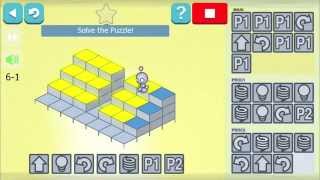
Lightbot is a programming puzzle game that teaches kids basic programming concepts with 50 levels and 20 challenge stars. Ideal for ages 8+ in multiple languages.
Lightbot is a game designed to introduce kids to programming concepts in a fun and engaging way. This puzzle game uses programming game mechanics to guide a robot through a series of levels and light up tiles. By doing so, players gain practical knowledge of basic control-flow concepts like loops, conditional statements, and procedures. This game is ideal for children aged eight and older, and has received rave reviews from The New York Times, TechCrunch, and Forbes.
Teachers and parents worldwide have chosen Lightbot as the go-to game when introducing kids to programming. It's not hard to see why - the game features 50 levels and 20 challenge stars to collect. Puzzle enthusiasts of any age will find Lightbot to be a must-have.
One of the best features of Lightbot is the ability to play the game in multiple languages. The game is available in English, French, Russian, Brazilian Portuguese, Spanish, Traditional Chinese, Simplified Chinese, Norwegian, Slovenian, Romanian, Indonesian, German, Polish, Danish, Croatian, Dutch, Slovak, Czech, Greek, Italian, Japanese, Korean, Malay, Thai, Hindi, and Swedish. Just select your preferred language from the main screen and you're good to go!
If you're playing on Google Play, you'll get exclusive access to new features like multiple save slots and progress tracking for multiple players. This means that multiple players can advance at their own pace in their own save slot, and even compete based on the number of levels finished, the number of stars collected, and the number of commands used to complete the game.
Overall, Lightbot is a fun and addictive game that will get kids hooked on programming in no time. Whether you're a parent or a teacher, it's a fantastic tool for introducing children to programming concepts and teaching them practical skills that they can use in the future.
 Gameplay et streams
Genres et catégories
Genres
Catégories
🏠2D🎨Stylisé
Jeux similaires


Unloop Logic offers thousands of addictive arrow puzzles with simple controls, challenging logic, and relaxing gameplay to sharpen your brain anytime, anywhere.


Explore the late-'90s internet to uncover hidden relatives, solve mysteries, and reconstruct the complex Roottree family tree through careful deduction.







Infos du jeu
| Développeur | SpriteBox |
|---|---|
| Date de sortie | Juin 14, 2013 |
| Date de mise à jour | Nov. 18, 2015 |
| Version | 1.6.5 |
| Prix | $2.99 |
Développeur
Plus de jeux par SpriteBox